> For the complete documentation index, see [llms.txt](https://docs.rpcfast.com/llms.txt). Markdown versions of documentation pages are available by appending `.md` to page URLs; this page is available as [Markdown](https://docs.rpcfast.com/rpc-fast-saas-solana/billing.md).
# Billing
We use Compute Units as an alternative to the ‘pay-per-click’ method. It provides greater flexibility and cost savings.
## Compute Units (CU) balance
The **CU balance** allows you to use methods with a specific price for the application. It enables you to optimize your spending and calculate the usage more precisely – pay only for methods you use.
#### RPC methods cost in CU
Applying each RPC method on Solana will cost you 1 CU. The only exception is [getProgramAccounts](https://solana.com/docs/rpc/http/getprogramaccounts) (10 CU).
Method
Cost in CU
Any Solana RPC method
1
getProgramAccounts
10
Certain methods are available on **paid plans only** or on a [dedicated Solana node](https://rpcfast.com/dedicated-solana-nodes). Read more in [Solana RPC Methods](/rpc-fast-saas-solana/solana-rpc-methods.md).
#### Do unused Compute Units (CU) roll over?
Unused Compute Units do **not** roll over to the next billing period.
Your CU allocation **resets at the beginning of each monthly billing cycle** according to the limits included in your subscription plan.
If your usage regularly approaches or exceeds your monthly CU allocation, consider upgrading your plan to ensure consistent capacity and avoid overage charges.
#### Websockets usage
Websockets are only limited by the amount of opened subscriptions. The amount of data transferred does not incur any CU usage.
#### Is bandwidth metered?
{% hint style="success" icon="rabbit-running" %}
RPC Fast does not charge for bandwidth usage!
{% endhint %}
**All paid plans include unlimited bandwidth**, meaning you are not billed based on the amount of data transferred through RPC, WebSocket, or gRPC streams.
Some RPC providers charge additional fees based on **bandwidth consumption** (e.g., per GB of data transferred). With RPC Fast, bandwidth is not metered, allowing you to stream on-chain data without worrying about unpredictable usage-based costs. However, please be aware of possible overage usage of your plan CU allocation – [see below](https://docs.rpcfast.com/rpc-fast-saas-solana/billing#overage-usage).
Your usage is instead measured through **Compute Units (CU)** and the **stream limits** defined in your subscription plan.
***
## Billing
#### When does my billing period start?
Your billing period begins when you activate a paid plan.\
Subscriptions are billed **in advance for each 30-day billing cycle** and automatically renew unless canceled.
#### Plans
* Each payment plan has its limitations.
* We count all requests received from each single account.
* We charge users by calculating the whole number of CUs for all apps, regardless of the apps number.
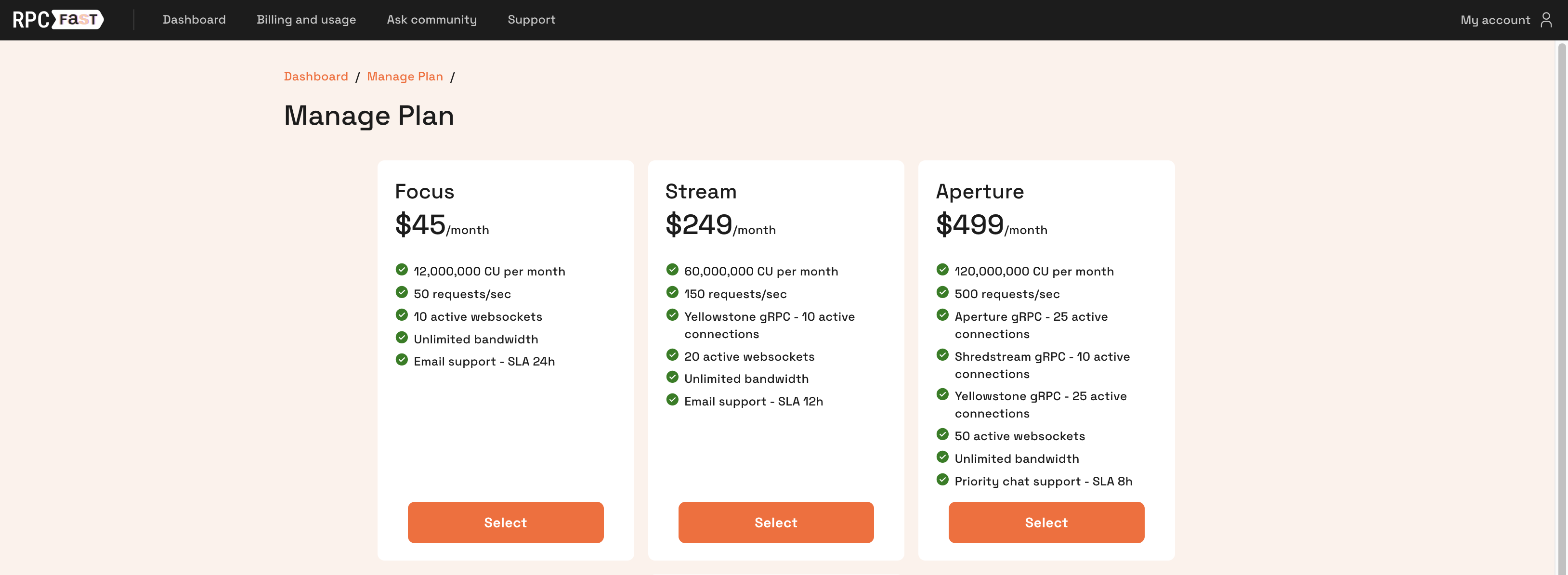
Check the **Dashboard** –> [Billing and Usage](https://solana.rpcfast.com/billing-and-usage/) for your plan CU allocation and usage and other stats.
Click "Manage" to change your plan at any moment.
#### Upgrade / Downgrade
You can upgrade or downgrade your subscription at any time. Select the plan that best fits your needs and follow the payment instructions.
If you **upgrade**, the new plan and its limits become available **immediately**.
If you **downgrade**, the change will take effect **at the end of the current billing period**, and your existing plan will remain active until then.
**Willing to upgrade shortly after starting with your current plan?** We can handle the upgrade manually – you only need to pay the price difference between your current plan and the higher-tier one.
For example, if you’ve been using the Stream plan for a week but realize you need ShredStream access, you can simply pay the difference and upgrade to Aperture. Your billing period will remain unchanged, with the upgrade applied immediately for the remainder of the current cycle. To request this type of upgrade, contact us using the **Support** button in the dashboard.
***
## Overage usage
#### How can I track my usage?
You can monitor:
* Compute Units (CU) consumption
* Active gRPC streams
* RPC request statistics
directly in the **RPC Fast dashboard** in real time.
#### What's the overage rate?
If your usage exceeds the monthly Compute Unit (CU) allocation included in your plan, additional usage will be billed at the overage rate of **$5 per 1M CU** at the end the active billing period.
#### What happens if I don't pay for overage usage in time?
If your account exceeds the allowed CU overage cap and the outstanding balance is not settled in time, **your account may be temporarily suspended** until the payment is resolved.
You are fully responsible for all usage and any overage charges incurred under your account.
If your usage regularly approaches or exceeds your monthly CU allocation, consider **upgrading your plan** to ensure consistent capacity and avoid overage charges.
{% hint style="success" %}
You can increase CU allocation by upgrading your plan ahead of the recurring subscription date.
{% endhint %}
***
## How Are gRPC Streams Counted?
A **gRPC stream** represents a single active streaming connection established between your application and the RPC Fast endpoint using Yellowstone gRPC (Geyser) or Shredstream gRPC. Each active connection counts as **one stream** toward the stream limit defined in your subscription plan.
For example, if your application opens multiple parallel subscriptions (to different programs, accounts, or transaction filters), each concurrent connection counts as a separate stream.
* A **stream is counted per active connection**, not per event or message.
* Multiple filters or subscriptions within the same connection are counted as **one stream**.
* Opening additional connections (for scaling, redundancy, or different services) will increase the number of streams used.
* Each plan defines the maximum number of concurrent streams allowed for your account.
If your application requires more simultaneous streams than your current plan allows, you can **upgrade to a higher plan** to increase the available stream capacity.
***
## Can I Cancel My Subscription?
Yes. You can cancel your subscription at any time by **downgrading to Start plan** through the "Billing" section of the dashboard. If you choose to downgrade, your current paid plan will still remain active until the end of the current billing period, after which it will not renew. Start plan is free of charge – feel free to come back to us when you are ready.
Alternatively, you may also delete your account completely.
## How to Delete My Account?
Go to "My Account" (menu in the top right) → "Delete Account" and follow the instructions to complete the process. Please note that **all associated data will be permanently deleted** once you confirm the request.
---
# Agent Instructions
This documentation is published with GitBook. GitBook is the documentation platform designed so that both humans and AI agents can read, navigate, and reason over technical content effectively. Learn more at gitbook.com.
## Querying This Documentation
If you need additional information that is not directly available in this page, you can query the documentation by asking a question.
Perform an HTTP GET request on the following URL with the `ask` and `goal` query parameters:
```
GET https://docs.rpcfast.com/rpc-fast-saas-solana/billing.md?ask=&goal=
```
`ask` is the immediate question: it should be specific, self-contained, and written in natural language.
`goal` is what the user is ultimately trying to achieve, the reason they need the answer. Sharing it helps GitBook give you a better, more relevant answer. A goal is most helpful when it describes the outcome the user wants rather than restating the question. For example, with `ask=how do I create an API token`, a goal like `automate deployments from our CI pipeline` lets GitBook tailor the answer to that use case.
The response will contain a direct answer to the question and relevant excerpts and sources from the documentation.
Use this mechanism when the answer is not explicitly present in the current page, you need clarification or additional context, or you want to retrieve related documentation sections.